NDSTokyoTrim 2.5 beta 2
New release of my popular trimmer for DS, grab it here http://eden.fm/ndstoykotrim/
TwitterLib and TwitMee update
Updated my delphi twitter library and the little twitme tool.
There was a problem with the unix timestamp related to daylight savings time which just recently started here.
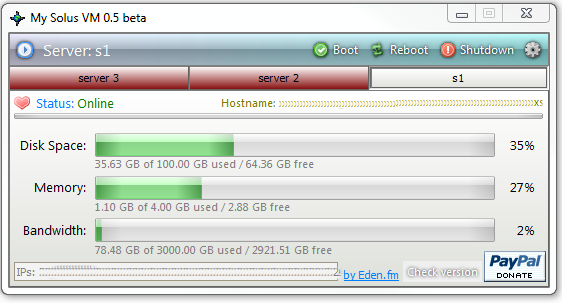
MySolusVM 0.1
Little desktop client to monitor the status of your server if you have a SolusVM control panel, for both VPS and Dedicated.
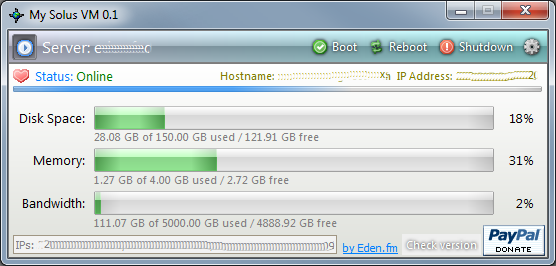
Next version will have multiple servers and tray notifications/warnings.

Tiny Uploader 2.52
2.52:
* added a caption in the status bar indicating the amount of pictures you can upload to Imgur and the time the limit will reset (50 per hour as per their API).
* changed dropbox for a couple buttons for the upload/capture options for a little more convenience.
Grab it at http://eden.fm/tinypic-uploader/
Twitter library v0.33
New version of my Twitter library for Delphi.
- xAuth/SSL support.
There are several changes in the login process, please read the usage.pas and changelog.
NDSTokyoTrim 2.5 beta
New version of my popular nds rom trimmer available after more than ~2 years. New:
- Unicode support (filenames in japanese etc)
- Trimming of DSi enhanced roms
Grab it here: http://eden.fm/ndstoykotrim/
Articles imported from techsuki
I’ve finally imported all my posts from techsuki.net into a new category here: http://eden.fm/category/techsuki/
I will be closing the old website soon.
another twitter library update v0.31
v0.3:
- Added a method: RetrievePIN(user,pass), with this you can avoid the user having to login and return with an access PIN, the app will retrieve it on its own by simulating a login etc. Use with care, since this method is prone to errors whenever Twitter changes something in their login and auth process. Check usage.pas for details on when to use this.
Note: reposted with a small modification to fix an error in the preauth process, redownload if you got 0.3 before.
Here’s the magic:
procedure TwitterCli.RetrievePIN(user,pass: ansistring);
Var h: THttpCli;
pvars,token,oatoken: ansistring;
ts: TStringList;
s,x: ansistring;
a: Integer;
begin
LastReq := trRequestRawAccess;
FCookie := '';
ts := TStringList.Create;
h := THttpCli.Create(nil);
with h do
begin
url := 'http://twitter.com/oauth/authorize?oauth_token='+OAuthToken;
RcvdStream := TMemoryStream.Create;
OnDocEnd := HTTPClientDocEnd;
OnHeaderEnd := HTTPClientHeaderEnd;
OnBeforeHeaderSend := HTTPClientBeforeHeaderSend;
OnCookie := GrabCookie;
try
Get;
except
on e:exception do
begin
if DebugMode then if Assigned(DebugMemo) then TMemo(DebugMemo).Lines.Add(e.Message);
ResultStrings.Text := 'Error: '+e.Message;
end;
end;
try
h.RcvdStream.WriteBuffer(#0' ', 1);
h.RcvdStream.Position := 0;
ts.LoadFromStream(h.RcvdStream);
finally
end;
end;
if h.StatusCode <> 200 then
begin
LastHttpStatus := h.StatusCode;
ResultStrings.Text := 'Error in raw authentication on 1st step';
h.RcvdStream.Free; h.RcvdStream := nil;
FreeAndNil(h);
FreeAndNil(ts);
TriggerReqDone;
Exit;
end;
if DebugMode then if Assigned(DebugMemo) then with TMemo(DebugMemo) do
TMemo(DebugMemo).Lines.Add(h.Cookie);
h.RcvdStream.Free; h.RcvdStream := nil;
if FCookie[length(FCookie)] = ';' then Delete(FCookie,length(FCookie),1);
if DebugMode then if Assigned(DebugMemo) then with TMemo(DebugMemo) do
begin
TMemo(DebugMemo).Lines.Add('----------------------------------------');
end;
s := ts.text;
if Pos('twttr.form_authenticity_token', s) > 0 then
begin
Delete(s,1,Pos('twttr.form_authenticity_token',s)+32);
s := Copy(s,1,Pos('''',s)-1);
end
else
begin
LastHttpStatus := 0;
ResultStrings.Text := 'Error in raw authentication prelogin';
h.RcvdStream.Free; h.RcvdStream := nil;
FreeAndNil(h);
FreeAndNil(ts);
TriggerReqDone;
Exit;
end;
ts.Clear;
with h do
begin
url := 'http://twitter.com/oauth/authorize';
RcvdStream := TMemoryStream.Create;
SendStream := TMemoryStream.Create;
pvars := ('authenticity_token=' + s +
'&oauth_token=' + OAuthToken +
'&session%5Busername_or_email%5D=' + user +
'&session%5Bpassword%5D=' + pass);
SendStream.Write(pvars[1], Length(pvars));
SendStream.Seek(0, soFromBeginning);
OnDocEnd := HTTPClientDocEnd;
OnHeaderEnd := HTTPClientHeaderEnd;
OnBeforeHeaderSend := HTTPClientBeforeHeaderSend;
Cookie := FCookie;
if DebugMode then if Assigned(DebugMemo) then with TMemo(DebugMemo) do
TMemo(DebugMemo).Lines.Add('Cookie before post='+FCookie);
ExtraHeader := 'Origin:https://twitter.com' + #13#10 +
'Referer:http://twitter.com/oauth/authorize?oauth_token=' + OAuthToken;
try
Post;
except
on e:exception do
begin
if DebugMode then if Assigned(DebugMemo) then TMemo(DebugMemo).Lines.Add(e.Message);
ResultStrings.Text := 'Error: '+e.Message;
end;
end;
try
h.RcvdStream.WriteBuffer(#0' ', 1);
h.RcvdStream.Position := 0;
ts.LoadFromStream(h.RcvdStream);
finally
end;
x := '';
s := ts.Text;
if Pos('<div id="oauth_pin">',s) > 0 then
begin
Delete(s,1,Pos('<div id="oauth_pin">',s)+19);
s := Copy(s,1,Pos('<',s));
for a := 1 to length(s) do
if (Ord(s[a]) > 47) and (Ord(s[a]) < 58) then
x := x + s[a];
end;
LastHttpStatus := h.StatusCode;
if x = '' then LastHttpStatus := 0
else AccessPIN := x;
if DebugMode then if Assigned(DebugMemo) then TMemo(DebugMemo).Lines.Add('PIN='+x);
if DebugMode then if Assigned(DebugMemo) then with TMemo(DebugMemo) do
begin
TMemo(DebugMemo).Lines.Add(ts.Text);
TMemo(DebugMemo).Lines.Add(h.Cookie);
end;
if h.StatusCode <> 200 then ResultStrings.Text := 'Error in raw authentication on 2nd step';
FreeAndNil(ts);
h.RcvdStream.Free; h.RcvdStream := nil;
h.SendStream.Free; h.SendStream := nil;
FreeAndNil(h);
end;
TriggerReqDone;
end;
procedure TwitterCli.GrabCookie(Sender: TObject; const Data: string; var Accept: Boolean);
begin
FCookie := FCookie + Data + ';';
end;
twitter library update
Slightly modified my delphi twitter library to work with the latest ICS distribution and to remove the dependency of an altered OverbyteIcsHttpProt file.
Twitter library for Delphi
2013 fix/update: http://code.google.com/p/delphi-twitter-library/
Edit: As of December 2012 Twitter api is using GZip in every callback, so you’ll have to enable content encoding before every Get/Post call, and then load the result from a gzipped stream in the RequestDone procs.
Edit June 2012: This twitter library is now deprecated and will no longer be updated. I’ve rewritten it as a generic OAuth lib to use with both Twitter and Imgur (and any other OAuth 1.0 services) for a closed source project.
This is my take on Open Auth and Twitter for Delphi. I recently had to look into it to update a twitter plugin for my Mal Upater application, so I made this small library along with a test application TwitMee. There is barely nothing at all for Delphi, and the little
I found was overcomplicated and didn’t work with Unicode (f.e. japanese symbols etc) (my library does).
I’ve been asked by a few people to make it open source, so here’s the code, use it freely as long you comply with the GPL v3 license.
Requirements: one of the latest versions of Delphi which includes Unicode. (probably easy to adapt using Jedi’s jcl implementation
for unicode strings as well).
UPS, hard drive mirroring
I finally did it, bought a decent UPS.
This is something I was holding up for years, for some reason, and finally decided to get one. The area I live at is quite prone to having micro power cuts whenever it rains, and it’s so extremelly annoying when the PC keeps rebooting from those, you have 930493 things open and bam, all gone; rarely any data loss since I usually save any open docs very often, but having to re-open and prepare all the apps I use etc etc, specially while programming, is really frustrating.
A couple years ago I actually bought a cheap, really cheap, UPS, and omg did it suck. It was around 35 euro; whenever there was a power cut it would last a few seconds.. 4..5 then bam, off, followed by a really loud beeeeeeeeeeeep that never turned itself off even after power came back until you pressed a switch. It’s been buried under my bed since then.
This week I bought this:
it was around 65 euro, not a fortune either, and seems to be working nicely. I tried to manually cut the power and waited a few minutes, seemed to hold up just fine. I had plugged the case, 1 of my 2 24″ lcd screens, and the DSL router to the battery-backed plugs.
The software to manage it seems a bit messy to setup and you need to figure out yourself, the documentation is severely lacking, but after playing around a bit I got it. The display for the remaining time while on battery didn’t seem to work, it never showed anything even when I cut the power; maybe it needs a few minutes to “learn”.. dunno.
A view of the status:
Along with the UPS I ordered also a 2TB disk as I was planning to get one soon, so I fit it along as there no extra shipping charge for another small item. Shipping sucks here btw, was around 20 euro for the box; usually at least ~15 is the minimum for anything from the mainland.
So, I replaced an old 500GB disk with it. I had a 50 GB partition on it that was “using” for OSX (installed, played around with for 10 minutes then never booted back); I wanted to keep it since I’d like to take a look at programming for Cocoa and the iCrap sometime, and if you ever tried to install an OSX backup you’ll know it can be a real PITA to get it working.
So I was looking for a simple app to mirror the drive or at least the osx partition; last time I used anything like that was many years ago, old norton ghost through a bootup cd with a dos-like interface etc.
I looked into a few apps, first Paragon’s Backup & Recovery, but that didn’t work. It has a few options to make backups and restore images etc, but nothing to mirror a drive. You need to first make an image into a file then it has some options to restore it, none of which let me specify my new raw disk. Then tried a few others till I found one that actually worked with no hassles: R-Drive Image
was pretty simple and straightforward. So I did the cloning, booted back into the new drive, OSX ran up just fine.
TwitMee 0.21
New version up, fixes a couple minor bugs.


Recent Comments